
A product marketing campaign rarely relies on a single video. A business typically needs a primary ad to introduce the product, shorter clips for social media, and product visuals for a landing page or online store.
These assets are often created separately, which can make the process slower and harder to keep consistent. Pollo AI groups its tools into three areas: Marketing Studio for ads and promotional videos, Commerce Studio for product and e-commerce visuals, and Creative Studio for image and video generation tools suited to campaigns that start with an idea rather than finished assets.
The workflow below shows how a team can use these tools to create a connected set of campaign materials without producing more content than the campaign actually needs.
How Can You Create a Main Product Ad in Pollo AI?
The best starting point depends on what the team already has. After opening Pollo AI, go to Marketing Studio and select a workflow based on the available material.
- URL to Video Ads is useful when the product already has a complete online page.
- Photo to Video Ads is a better fit when there are product images but no video footage.
- Script to Ad Video can turn approved campaign copy into a video.
These tools serve as different entry points; a campaign normally needs only one of them to create its main ad.
Add the Source Material and Generate the First Version
Paste the product URL, upload the product images, or enter the script, depending on the selected workflow. Then choose the available creative settings and generate the video. If the campaign requires a particular visual approach, users can also explore available models such as the GoEnhance AI video generator on Pollo AI and select the option that best fits the intended content.
The source material matters. A product page with outdated details or a group of photos showing different product versions can make the result less consistent. It is worth checking these materials before starting rather than correcting the same issue in several generated versions.
For a short ad, one clear benefit is usually enough. If the product has several important selling points, separate videos can give each one more room instead of forcing everything into a single script.
Create a Second Version with a Different Hook
Once the first ad is ready, generate another version with a different opening. For example, one video could begin with a common customer problem, while another could show the product being used immediately. The main message can remain the same.
Keeping most of the content unchanged makes it easier to see whether the opening affects how the video performs.
How Can You Create Supporting Product Assets?
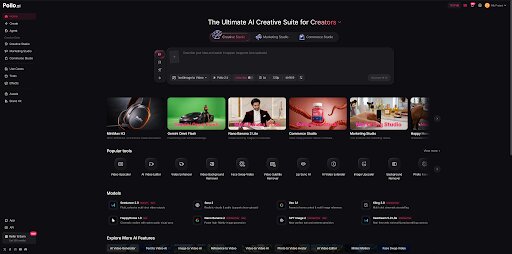
The main ad may attract attention, but customers often need clearer product information before they decide to buy. Product images and showcase videos can fill that gap on product pages, online stores, and social channels.
Open Commerce Studio and select the tool that matches the asset needed. AI Product Shot can create clean product-focused images, while Product Staging can place a product in a lifestyle scene or campaign setting.
Create Product Images and Showcase Videos
Upload the product image, choose or describe the intended presentation, and generate the visual.
A simple product shot may work better for an online listing, while a lifestyle image can give social content more context. The images do not need to use the same layout, but the product should look consistent throughout the campaign.
If the product page would benefit from motion, select Product Showcase Video. This can provide a closer look at the product’s design or key features without repeating the main ad.
How Can You Create a Campaign Without Existing Assets?
Some campaigns begin before product photos or video footage are available. In this situation, Creative Studio can be used to develop visual concepts from written descriptions.
Develop Concepts with Text to Image or Text to Video
Select Text to Image to explore a campaign’s visual direction. Describe the product, setting, style, and composition, then generate an image that can be used to evaluate the concept.
Select Text to Video when the campaign is built around a scenario or product use case. Describing the main action and environment gives the model a clearer idea of what the scene should show.
These tools can be useful for testing ideas before arranging a photoshoot or filming. For a real product, however, concept visuals should not be treated as final product images unless the generated details match the item being sold.
How Can You Adapt the Campaign for Different Platforms?
After creating the main ad and supporting visuals, return to Marketing Studio and choose the platform-specific workflow needed for the campaign. Pollo AI includes tools for channels such as TikTok, Instagram, Facebook, and YouTube.
Create Short-Form and UGC-Style Content
For TikTok or Instagram, use the main campaign message as a starting point, but shorten the setup and bring the product into the video earlier. A quick demonstration, a familiar customer problem, or a strong opening visual can help establish the message.
If a more personal presentation suits the…